What we do

What's taking
too long?

We build automations, custom systems, AI integrations and websites that remove manual work from your business.

Automated workflowOutlook
14 unread emails
  1. Email
  2. Read
  3. Extract
  4. Check
  5. Update CRM
  6. Notify team
Running…
The problems we solve

This is the
stuff we fix.

If it happens repeatedly, there's a good chance we can improve it with automation, AI or a better system.

Too much copy + paste

Information constantly moving between emails, spreadsheets and systems.

Things get missed

Follow-ups, documents and tasks rely on somebody remembering.

Systems don't talk

Your website, CRM, email and spreadsheets all do their own thing.

Everything lives in Excel

The spreadsheet started small. Now apparently it runs the business.

Documents need checking

Invoices, settlement letters, IDs and other documents require manual review.

Customers keep chasing

They can't see what's happening, so your team spends time providing updates.

What we build
01 — Automation

Stop doing
the same thing twice.

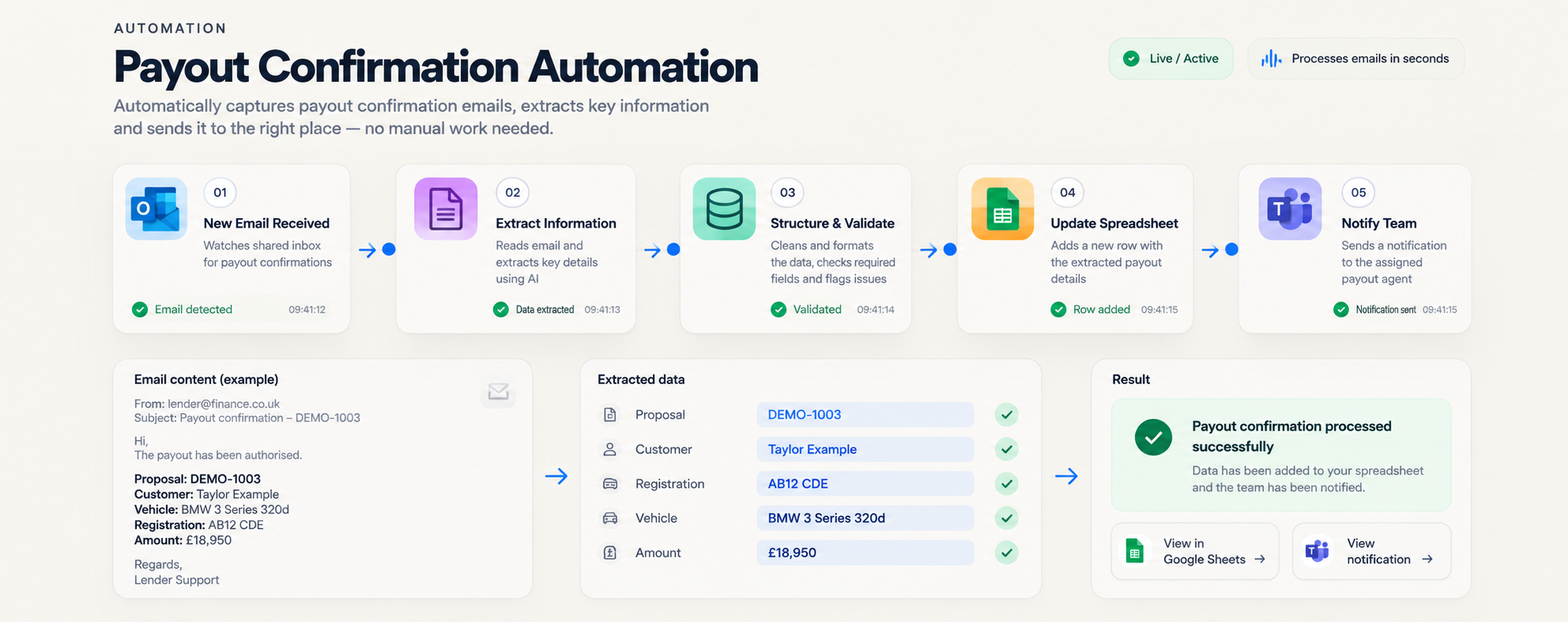
We build automations that handle repetitive work, connect your systems and keep things moving without manual input.

  • Email processing
  • Data entry
  • Routing & notifications
  • Document workflows
  • Reporting
  • System integrations
Built with
MakeZapierPower Automaten8nAPIsWebhooks
Explore automation →
Example workflow
  1. Outlook→
  2. Make→
  3. Extract data→
  4. CRM→
  5. Notification

Illustrative diagram — not a screenshot.
02 — Custom CRM & business systems

Software that fits
the business.

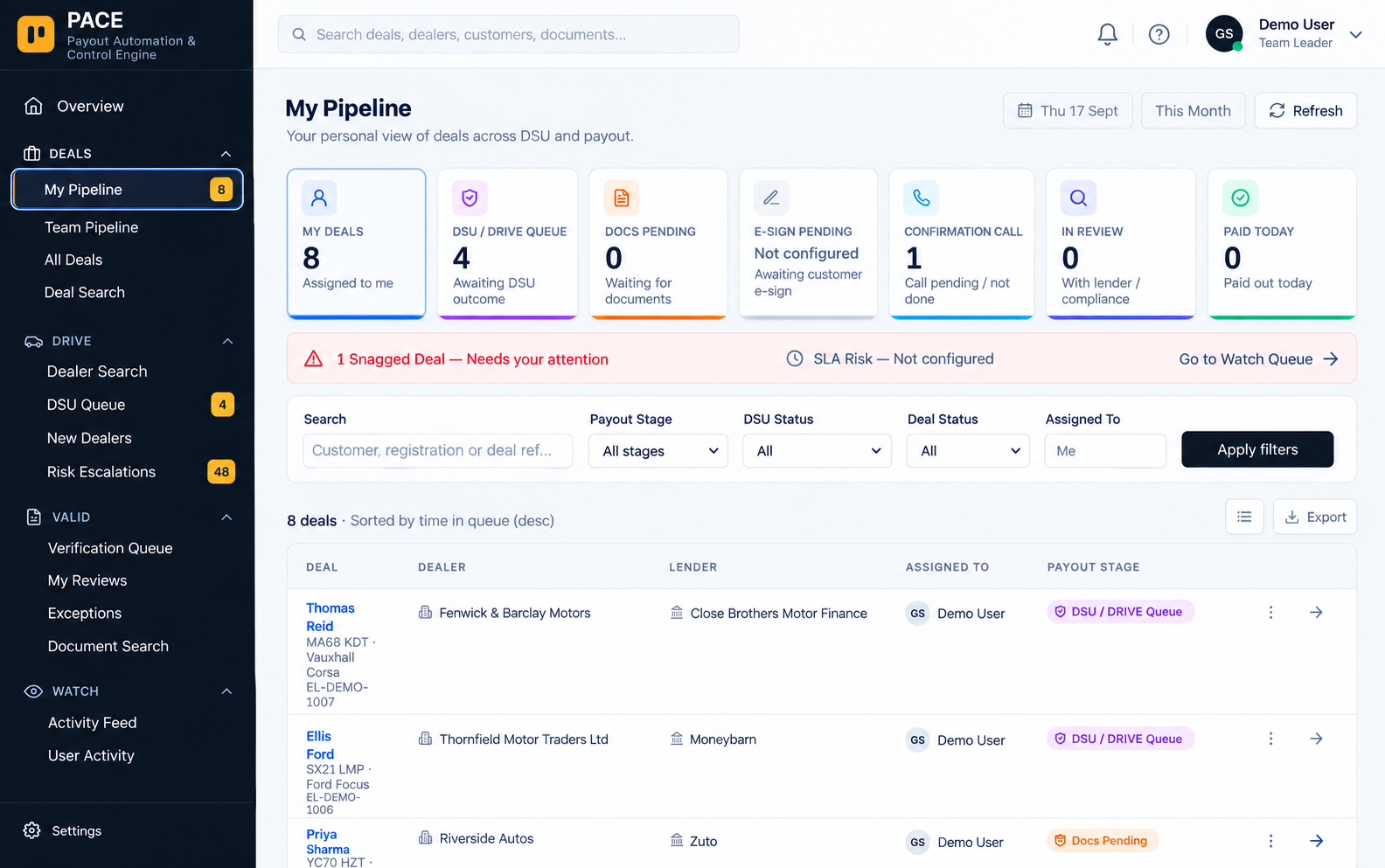
Custom CRM and internal tools designed around your actual processes — not forcing your business to fit somebody else's software.

  • Custom CRM systems
  • Operational tools
  • Pipelines & workflows
  • Permissions & reporting
  • Customer/dealer portals
  • Integrations with existing tools
Technology
ReactSQLSupabaseMicrosoft 365APIs
Explore CRM & systems →
PACE custom operations platform

PACE — real build.

03 — AI integration

Useful AI.
Where it actually
makes sense.

We integrate AI into real workflows to read, understand and process information — saving time and reducing manual work.

  • Document reading & extraction
  • Data classification
  • Internal assistants
  • Email understanding
  • Summaries & analysis
  • Human review when required
Working with
OpenAIClaudeAPIs
Explore AI integration →
Example document workflow
  1. Document→
  2. AI reads→
  3. Information extracted→
  4. Rules checked→
  5. Human review→
  6. System updated

Illustrative diagram — not a screenshot.
04 — Websites & portals

Not just something
nice to look at.

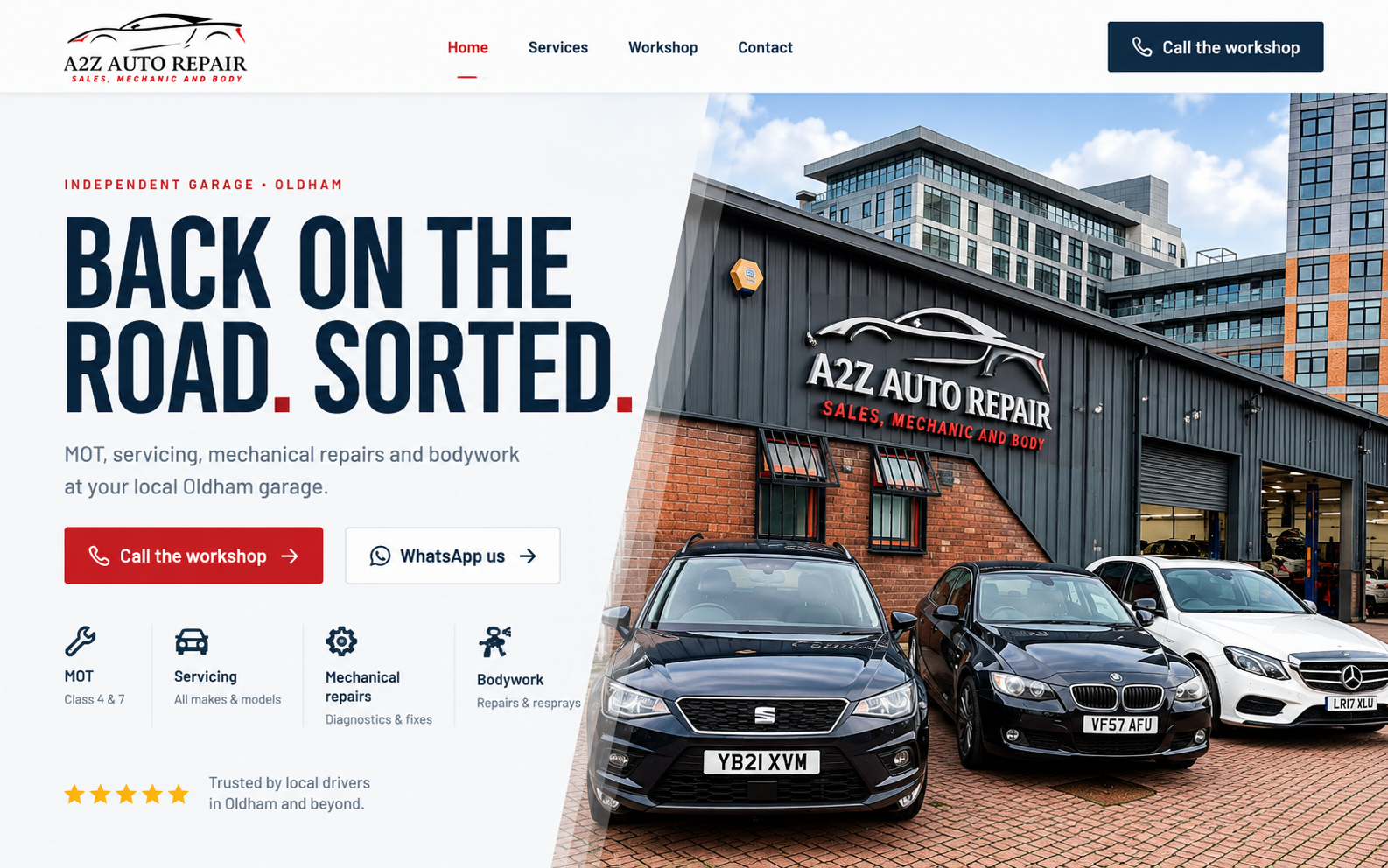
Modern websites and customer portals that look great, generate enquiries and connect directly to your systems.

  • Business websites
  • Customer portals
  • Lead capture & booking systems
  • Application journeys
  • CRM-connected websites
  • Ongoing support
Technology
ReactTanStackSupabaseCalendly
Explore websites →
A2Z Auto Repairs website

A2Z Auto Repairs — real client build, in development.

What you can ask us to build

Four ways to start.

Got a process in mind? →

Automation build

Take a repetitive workflow and redesign, automate, test and connect it to the systems you already use.

Custom business system

A CRM, internal tool or operational system built around the way your business actually works.

AI workflow

AI inside an existing process, where reading, extracting, sorting, summarising or assisting genuinely helps.

Website + portal

A customer-facing website or portal that connects into the systems behind the business.

The tools behind the work

The right tool.
For the right job.

We don't force every business into the same platform. We use the tools that make sense for the system we're building — and connect them to the software you already use.

Make
Visual automations between apps
Zapier
Quick app-to-app connections
Power Automate
Automation inside Microsoft 365
n8n
Flexible, self-hostable workflows
See it in action

Real processes.
Real tools.

Here's an example of how different tools can connect to solve a real business process.

A new lead comes in
  1. Website form
  2. Automation
  3. AI / validation
  4. CRM
  5. Outlook / Teams

Demonstration of what can be connected — not a specific client setup.

The bigger picture

One business.
Not ten
disconnected tools.

We connect your website, CRM, data and tools so information flows, work gets done automatically and your team has a clearer view of what's happening.

Customer
Website / portal
Automation
CRM
AI
Database
Team
Reporting
Communication
How we work

A simple way
of working.

Just a clear process to get from your current setup to a better one.

  1. 01

    Show us

    Show us how it works now. The messy version is fine.

  2. 02

    Find it

    We find what's repetitive, disconnected or taking too long.

  3. 03

    Build it

    We automate it, connect it or build something better.

  4. 04

    Make it work

    Test it properly, put it into the real process and improve it.

Not sure if your problem is big enough?

It doesn't need to be a huge project. Sometimes the right starting point is one annoying process, one disconnected system or one piece of repetitive work. Show us what's happening and we'll tell you whether there's something worth improving.

Tell us the problem →
Let's talk

Got something annoying?
Let's build something better.

Tell us what's slowing your business down. We'll work out whether automation, AI or a better system can fix it.